Posts

Helpful Hints on Developing a User Friendly Database

Image
Developing an effective database application requires an interface that is easy for the user. This paper will explore the features of SAS /AF and methodologies of building a successful database. It combines user interface suggestions for the front end while also suggesting back end SCL , SQL and data step logic that makes the software efficient to program and to operate. The majority of the examples are technical tips but there are also shared lessons learned from collaborating with end users which prove to be very important in creating an effective application. Overview There are many solutions for creating a data entry system ranging from a simple Excel spreadsheet to a sophisticated Oracle database. Each set of technologies works well for a specified task. This paper will explore a database containing clinical information used in regulatory submission. SAS /AF is very suitable for this since all analysis work for clinical data requires SAS . The scenario of this particular proj...

How to Develop User Friendly Macros

Image
SAS ® macros help automate tasks that are done repeatedly. However, if they are not easy to use or debug, they may never be used. This paper will describe approaches to developing and maintaining SAS macros that are easy to use. Some of the topics covered include: effective documentation of macro header portable code for use with different OS error and warning message handling paper and online documentation use of nested macros and nested macro variables keeping macros simple for debugging A little effort can go a long way towards creating a successful SAS macro . This paper will present tips and techniques that are not always obvious. Besides getting the resulting numbers to the user, a user friendly macro can enhance the entire experience. Macros Overview SAS macros are great at automating repetitive tasks as a code generator. However, there are some features of macros that make them difficult to understand and debug. The syntax of SAS macros is similar to that of traditional...

Making Code Review Painless

Image
Code review is an essential step in the development of concise and accurate SAS ® programs. It is a required verification step in performing validation in a regulated environment. This paper will present techniques and a macro that can be freely downloaded to automate this task. The % coderev macro will perform many of the common tasks during a code review including: 1. Spell checking headers and comments 2. Reviewing all input and output datasets of the program 3. Comparing defined macro variables versus macro variable usage 4. Checking for multiple macro calls that are not in a macro library 5. Evaluating hard code logic Evaluating sort order of all datasets These tasks are normally performed by an independent reviewer instead of the original programmer. By automating the tasks, the code review process will ensure that the smallest mistake can be captured through reports to ensure the highest quality and integrity. What normally is a dreaded task can now be done with ease. Code R...

Outsouring and Offshoring SAS Programming

Image
Globalization is the reality of doing business in today's economic environment. SAS programmers and organizations that use SAS who choose to ignore it will face extinction. Outsourcing has had a significant effect on many industries dealing with information technologies. Knowledge workers face the same challenges now as manufacturing workers faced in previous decades. This paper will give you insights into offshore outsourcing as it pertains to SAS and provide strategies on how to navigate and work within this environment. Some of the topics discussed include: Pros and Cons of outsourcing SAS related programming Types of SAS programming within the Pharmaceutical industry that will be outsourced Strategies on successfully managing a local team while outsourcing SAS projects Outsourcing is not a new phenomenon but rather another step in the evolution of doing business in a technology driven global economy. SAS work is increasingly being outsourced to local Contract Research Or...

Cost Effective Ways to Generate DEFINE.XML

Image
You can have greater understanding and management of your data if it is well documented with data definition documentation in the format of DEFINE. PDF and DEFINE.XML . As the number of datasets and variables increase, this can be very resource intensive. The time consuming documentation task is compounded by the fact that there are constant changes to the data so the documentation has to keep up with the changes in order for it to be useful and accurate. This paper will suggest methods and tools that would enable you to document your data definition document without purchasing a complex expensive system. Introduction When you plan for a road trip, you need a map. This is analogous to understanding the data that is going to be part of an electronic submission . The reviewer requires a road map in order to understand what all the variables are and how they are derived. It is within the interest of all team members involved to have the most accurate and concise documentation pertaini...

Optimizing Your SAS Performance

Image
Google has become very successful by developing an efficient search engine running on commodity hardware. It no longer uses the old model of putting all its resource onto one super computer, but rather it spreads that processing onto a cluster of smaller machines running in parallel to form a grid . Gordon Moore made an observation in 1965 predicting that the number of transistors per square inch used on computers would double every year. This trend has become law and continues to elevate the ubiquitous and relatively inexpensive desktop and laptop computers. This paper will discuss how you can cluster computers in a grid to optimize the execution of SAS programs. Some of the techniques discussed include: Implementing supercomputer power with commodity hardware Submitting SAS programs sequentially while maintaining inter program dependencies Threading multiple groups of programs for optimal performance Measuring SAS performance with Statmark ™ , a standard metric for a cross plat...

SAS for Excel Jockeys

Image
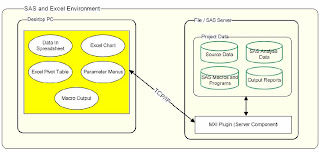
The ubiquity of Microsoft Excel and Word on desktop computers has made it a default entry point for many users to view and edit their information. Once Excel was included into the MS Office suite in 1993, it became the killer app overtaking other spreadsheet heavy weights such as Lotus 1-2-3. Although Excel has analysis capabilities, it does not have the powerful statistical procedures and depth of SAS . When analyzing certain types of data, such as financial information, Excel is the tool of choice. Its capabilities to easily generate graphs along with the visual pivot table provide powerful methods to view and analyze data . In certain cases, however, Excel is not capable of performing particular tasks which SAS can provide. Some of the topics that this paper will elaborate on include: Connecting SAS to Excel – The use of TCP port communication allows Excel to connect directly with a SAS session SAS Macro Management – Managing SAS macros that can be delivered to Excel ...